
CASE STUDY
How might we help the user streamline the adoption process by providing a more informative website or app?

1. Define the Problem
Executive Summary
- Project Overview: Designed a responsive end-to-end Minimum Viable Product (MVP) tailored for dense urban markets, optimizing the fragmented and emotionally high-friction process of metropolitan pet adoption.
- The Challenge: Urban pet adoption suffers from severe information asymmetry. Prospective adopters face high anxiety due to a critical lack of transparency regarding a rescue dog’s behavioral history, verified temperament, and past environmental trauma.
- The Strategy: Developed a robust digital ecosystem that bridges the gap between disparate municipal shelters and city residents. The solution features an intuitive, advanced Behavioral Filtering Framework, verified source data badges to establish credibility, and a streamlined, secure digital screening and onboarding pipeline.
- The Outcome: Successfully accelerated the discovery-to-application timeline while prioritizing risk mitigation for the user. By implementing a branching onboarding logic and data-driven profiling, the platform reduces user drop-off, eliminates cognitive overload, and ensures highly compatible, lasting matches.
Hypothesis
People want to have more choices and information about the pet that they intend to adopt. Often, there is not enough information provided during the online search.
Pain Point #1
Is the dog good with kids, families, other pets?
Pain Point #2
What type of personality or temperament
does the dog have?
Pain Point #3
Is the dog potty trained? Able to adapt to a new apartment or home environment?
Pain Point #4
Pain Point #5
Is the dog very active/hyper and does it require a lot of walking?
Pain Point #6
How Might We
- Optimizing the Matching Engine How might we leverage localized data to help metropolitan residents efficiently identify highly compatible dogs for adoption?
- Streamlining the Cross-Agency Ecosystem How might we design a centralized digital touchpoint that seamlessly connects urban dwellers with disparate municipal and private adoption organizations?
- Reducing Friction in the Adoption Pipeline How might we transform a traditionally fragmented, information-heavy onboarding process into an intuitive, transparent, and responsive digital experience?
Goal
Create an NYC-focused MVP that improves adoption confidence, with scalability as a future opportunity.
My Approach & Design Process

Key Skills:
• UX Design • User Research • User Testing
• Information Architecture • Personas
• Sketching • Mockups • Wireframing
• Prototyping • Metrics & Analytics • Case Study • Problem Solving • Affinity Maps
• Empathy Maps • Interviews • User Flows
• Journey Maps • User Story • Agile Methodology • Design Thinking • Web Design
- UX Design
- User Research
- User Testing
- Information Architecture
- Personas
- Sketching
- Mockups
- Wireframing
- Prototyping
- Metrics & Analytics
- Case Study
- Problem Solving
- Affinity Maps
- Empathy Maps
- Interviews
- User Flows
- Journey Maps
- User Story
- Agile Methodology
- Design Thinking
- Web Design
Phase 1: Discovery & User Friction Audit
Map out the problem and pick an important area to focus
Define the Problem: Users want to know as much information about the new dog that they want to adopt before they get too deeply involved in the process.
Customer Journey Map
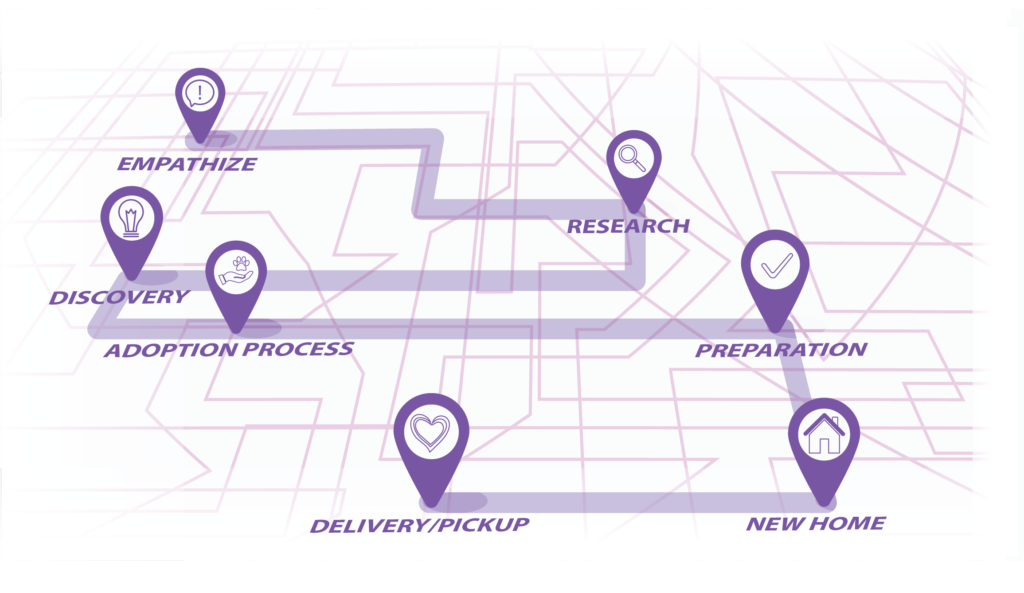
Project Objective: Formulated a comprehensive digital interface system and high-fidelity prototype focused on reducing decision fatigue and streamlining user workflows across web and mobile platforms.
Persona
Target User Profile & Feature Prioritization
Primary Friction Points:
- Information Asymmetry: Deep anxiety regarding the lack of transparency around a dog’s behavioral history, temperament, and past environment.
- Risk Mitigation: A critical need to identify potential behavioral risks or hidden trauma before committing to the legally binding and emotionally heavy adoption process.
- With these user constraints in mind, New York City was selected as our launch market to test scalability before expanding to other metropolitan hubs.
- To directly solve for the transparency gaps identified in our research, I prioritized a high-fidelity interface focused on comprehensive pet behavioral profiling and historical data verification. This strategic feature alignment directly answers our users’ highest-priority needs, serving as the foundational pillar for our MVP release.
Cities
Washington, DC Organizations
• Rural Dog Rescue
• Humane Rescue Alliance
• City Dogs Rescue
• Partnership for Animal RescueCities
Atlanta, GA Organizations
• Atlanta Humane Society
• PAWS
• Fulton County Animal Services
• Atlanta Dog Rescue Cafe
Manhattan, NY Organizations
• ASPCA Adoption Center
• Mayor’s Alliance for NYC’s Animals
• Animal Care Centers of NYC
• Time Out
Philadelphia, PA Organizations
• Philadelphia SPCA
• PAWS Adoption Center
• Street Tails Animal Rescue
• Philadelphia Animal Welfare Society
Boston, MA Organizations
• Animal Rescue League of Boston
• Boston Dog’s Organization
• Boston Adoption Center
• MSPCA Animal Care and Adoption Center
Phase 2: Competitive Landscape Analysis
Strategic Competitive Analysis & Market Gaps
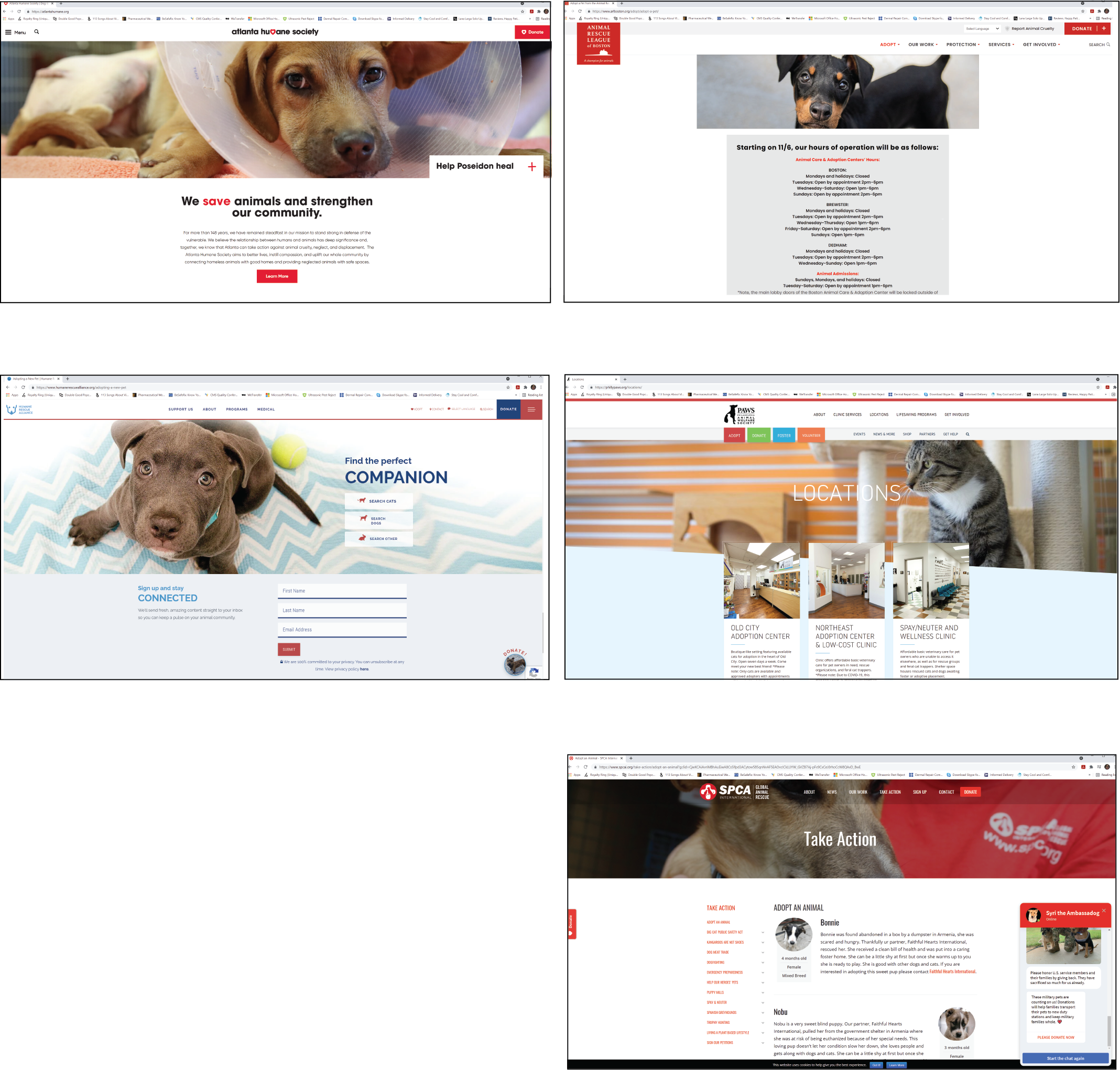
I conducted a comprehensive competitive assessment of existing municipal and private animal adoption platforms across five major metropolitan markets. The goal was to analyze their information architecture, localized feature sets, and regional operational constraints.
The Market Friction: The current landscape is highly fragmented and siloed. Existing platforms operate exclusively as hyper-local entities, capturing data for only a single city with zero cross-regional interoperability.
The Product Opportunity: This extreme fragmentation reveals a clear market vacancy for a centralized, scalable multi-city digital ecosystem. By aggregating regional data into a unified interface, City Pups can establish an expansive regional network while offering tailored, location-specific user experiences within a single web platform.
Crazy 8 Sketches

The solution screen will have an image of the geographic location that the user has selected. For my first prototype, I shall design for Manhattan, NY. However, following screens will be based on user selection and the accommodations that they pick. The 50 states will be represented in following screens at a later date.
The user will be provided with critical information to determine breed, age, size, behavior, temperament, lifestyle, ability to cohabit with children, families, and other pets. Essential information about the dog’s health/medical history, suitability for home or apartment living, walking space considerations, must be analyzed.
Day 3 - Decide. Make Decisions. Storyboard
Rationale for decision: Ellie expressed that she was uncomfortable with the adoption process and the lack of information provided for the user. I would like to design a MVP that gives the adoptee the information that they need in order to facilitate the adoption process. The user will be able to see a variety of dogs, select the one that they like most, see details about the animal and its background, temperament, medical conditions, history and relevant details about the pet. Note: Layout of city screens basically stays the same except for specific city images throughout. Information is tailored to each city that the user searches. Screens 1, 2 and 3 are the most important screens, particularly screen #1, because it is the most informative and the first that the user will interact with.
Phase 4: Responsive High-Fidelity UI Production



Prototype The Experience
The Challenge was to create a product that helps the user in the adoption process. The user in this scenario is “Ellie,” a 27 year old woman living in NYC who wants to adopt a dog, but is not confident that she knows how to start the process. She is concerned that since she lives in an apartment in a crowded city, NYC; that she needs to have a dog that is good with people, able to be around her family, friends, and strangers without having behavioral issues. She also expressed that she wanted a young dog, one that was healthy and had high energy, that she could walk about in the city. My human centered design approach targets the user because I want to make this process easy for them. My desire is to always keep them in mind and produce the best product for them.
The Product that I created helps the user navigate the adoption process by providing essential information, as well as to inform about breeds, behaviors, prices, health, etc. CityPups.org is specifically targeted for dog lovers.
The Problem: HMW make a MVP that eases the adoption process for its users?
The Goal: Design a MVP for CityPups.org that makes the dog adoption process less intimidating for its users.
For this Case Study, I created a MVP of a website/product that would appeal to users who are initiating the adoption process.
My hypothesis was to take a “city-specific approach” which could be tailored to any location. My MVP targets NYC, but has the option to navigate to the city of choice for the user. All 50 states would be represented in my MVP. They can do this by selecting the menu for that city. This approach leaves no one out and provides limitless options for the adoption process. The user is informed on a state by state basis of the breed selections and characteristics of their choice. They are allowed to see, via video, their dog in action. This was one of the concerns that Ellie had as a user. There is also an option to sign up to be a foster parent if one is not ready to adopt. I believe that all considerations were made to help the user navigate the adoption process.
The site is user-friendly, engaging and informative. I created the prototype in Adobe XD using their UI kit since this was an accelerated exercise. The result is an engaging site, clean, has visual hierarchy, imagery relative to the topic and most importantly, easy for the user to find the helpful information that they need to make an informed decision.
Day 5 - Test
Since this was an accelerated exercise/Case Study, and time was of great importance, I had to do unmoderated testing of the prototype by sending the link to (7) people, in case I didn’t hear back from someone. So glad that I did because I didn’t hear back from 2 people. The users that I tested were friends, family and an associate (UX Design manager at Google) that I met through Linkedin.
The questions asked: Would this site aid you in adopting a pet? Would it inform you? Why would it inform you? I had a hypothesis that this MVP would be useful to users in every state.
User #1: Yvonne, stated that she loved the site and that she would be able to find out information on a dog breed that she liked. She asked if there was a site like this for NC, where she lives. I said, “not at this time, but that is why I provided the state lookup” for upcoming iterations of this MVP. She said that I provided the areas of interest that she would need to answer the pertinent questions about the adoption process.
User #2: Jackson, Google UX Design Manager – I met through my Linkedin interview and we have kept in touch. He always offers insights into the work that I send him. Using Lean UX methodologies, he said in real world UX, one would have to have a longer timeframe than what I was provided for testing, but since this was a case study, he understood and commented that he liked the site, it was clean, easy to navigate, informed the user, and should help anyone who wanted to adopt. He suggested that I rearrange the navigation order for my IA based on user needs.
User #3: Lee, He said that he liked it and thought that it would be helpful if trying to adopt a dog.
User #4: Nellie, Graphic Designer. She loved the site and she has dogs, so it was doubly good for her. She had no comments other than that she really liked the design. From a design standpoint, she didn’t think that I needed to have the vector of the NYC skyline since I had already had it in text on the previous page. She said that the user would know that they were adopting a dog in NYC from that information. Point noted. She also liked the fact that I redid the logo since the original was low resolution.
User #5: Swati, 508 Compliance Expert and former coworker and friend. She knew how stressed I was to complete this task, so she was on hand to help out. I sent her the link through email after 9pm and she looked at it and had no changes. She loves dogs and thought that the site was great.
Conclusion:
Testing revealed users valued transparency, detailed profiles, and trust signals, while some preferred stronger shelter connection points before committing.
User Testing

What I Learned
Day 1, Mapping: This portion of the case study was critical in helping me develop my HMW questions. After reviewing the Challenge, I was able to empathize with Ellie and her needs. Creating the map allowed me to know what principles/concepts were most important to convey in an MVP and how best to approach the problem that I needed to solve in order to help the user. Mapping this out helped me with my thought process, steps and path toward a viable user experience and solution.
Day 2, Sketch my Solution: I like sketching, so this part was fun. It was essential to review other adoption websites in various cities in order for me to formulate my hypothesis that an MVP would be essential to users in every city that wanted to adopt a dog. I searched competitive websites in Washington, DC, Philadelphia, PA, Boston, MA, Atlanta, GA and Manhattan, NY. NY is where the persona lives and I wanted to see what types of adoption websites they had. Very useful information and it helped me to ultimately create a nice MVP that helps the user (Ellie) in the adoption process.
Day 3, Decide and Create a Storyboard: This was a critical step in helping me to envision what I wanted to include in my prototype screens. The relevant information was to inform the user about the adoption process and in doing so, I needed to have enough images about various dog breeds, their characteristics, background, etc. The site/MVP had to be engaging in order to instill confidence in the user to navigate the site as well as inform them about the adoption process. I liked sketching the screens and determining what needed to be on each screen.
Day 4, Prototype My Solution: I LOVE working in Adobe XD and InVision! I used the UI Kit in Adobe XD, which made the design process quicker. I’ve added screen shots of the prototype in this presentation. I’ve designed a clean, very inviting MVP that I believe would help the user navigate the adoption process.
Day 5, Validate: I sent the link to the finished prototype to 7 people via email. Since this was a case study and done at a very accelerated pace, I’d alerted both friends, family and colleagues that I needed their help and all that responded were willing to help me finalize this last step in the process. Stressful, but I completed the testing and got very favorable feedback from all. I did not hear back from 2 that I sent the link to, but it was late in the day. This is why I always send links to more people than I need to test. The Case Study was a rewarding process, but one that I am glad to have completed. I learned that I would like to have more time to allow for the case study and more testing of my hypothesis. Lol!
What I will do differently: I plan to revise the hierarchy of the information architecture and perhaps add a CTA.
Future Iterations: A mobile app for every city!